

Building forms that work well for every visitor is much harder.
As websites grow, forms naturally become more sophisticated. A simple contact form evolves into an event registration form. A quote request needs different questions for businesses and individuals. A support form asks follow-up questions based on the issue someone selects. Before long, what started as a straightforward form becomes cluttered with fields that only apply to certain visitors.
Showing every question to everyone isn’t just unnecessary—it creates friction. The more irrelevant fields people encounter, the more likely they are to lose interest or abandon the form altogether.
Conditional Logic solves this by allowing forms to adapt in real time. Instead of forcing every visitor through the same experience, it displays only the fields that matter based on previous answers. The result is a cleaner user experience, more relevant submissions, and forms that are far easier to maintain as your requirements grow.
What Conditional Logic Actually Is
Conditional logic lets fields appear or disappear based on the answers already given. Rather than showing everyone every field, the form reveals only what’s relevant to this person, right now.
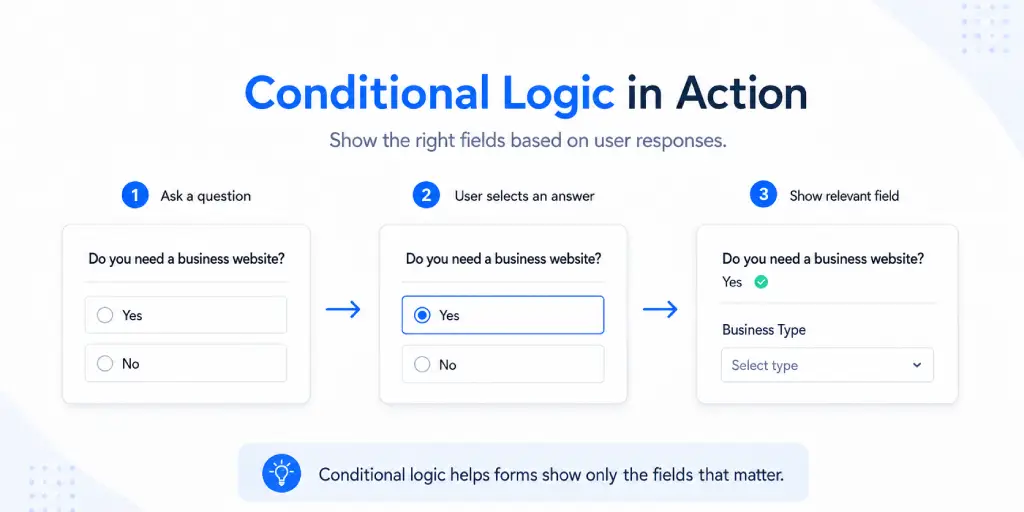
The mental model is a simple rule attached to a field:
Show the user select business website field then show another filed like business type.
That’s it. Flip a question, and the fields that depend on it react instantly. The form gets shorter, feels smarter, and asks nobody a question that doesn’t apply to them.
How It Works in BoldForm
In the BoldForm builder, conditional logic lives on each individual field. You enable it, choose whether the rule shows or hides the field, and then define one or more conditions that drive it.

Rules can combine. A single field can depend on several conditions at once, and you decide how they’re evaluated:
All — every condition must be true (logical AND).
Any — a single condition being true is enough (logical OR).
The “All” and “Any” options make Conditional Logic flexible enough for real-world forms. “Show the shipping section if they’re not picking in-store pickup and the order total is above a threshold” is a two-condition rule, not two separate fields.
The comparisons cover the cases that come up in practice:
| Operator | Fires when the source answer… |
| is / is not | Exactly matches (or doesn’t match) a value |
| contains / not contains | Checks whether text includes a value |
| starts with / ends with | Matches the beginning or end of text |
| greater than / less than | Compares numeric values |
| is empty / is not empty | Checks whether a field has been filled |
Text comparisons are case-insensitive, and the numeric operators only act when both sides are genuinely numbers — so a stray letter can’t produce a surprise match.
The form reacts instantly. As soon as someone changes a driving answer, dependent fields slide in or out — no page reload, no submit round-trip. The form feels like it’s paying attention, because it is.
The Part Most People Forget: It’s Enforced on The Server Too
This is where a lot of “conditional logic” implementations quietly fall short, and it’s the detail worth calling out to a developer audience.
Hiding a field in the browser is a presentation. It doesn’t, by itself, make the field safe. If validation still expects that hidden field, a visitor can get trapped behind a “this field is required” error for a question they can’t even see. And if the field’s value still gets stored, your entries fill up with contradictory data — answers to questions the form logically decided didn’t apply.
BoldForm evaluates the same rules again on the server when the form is submitted. A field that resolves to hidden is dropped before validation and is never written to the entry. That gives you two guarantees:
- A hidden field can’t block a submission; it has no business blocking.
- Your stored data stays clean — no orphaned answers to skipped questions.
The client-side logic makes the form feel good; the server-side enforcement makes the data correct. You want both, and it matters that they agree.
Where Conditional Logic Shines
A few patterns you’ll reach for again and again:
- Branching intake. “Are you a business or an individual?” splits into two different sets of follow-up questions on the same form.
- Progressive disclosure. Keep the form short by default; reveal detail fields only when an answer makes them relevant (“Other” → a free-text box; “Yes, I need delivery” → an address block).
- Qualification. Surface or suppress sections based on a number — order size, quantity, budget — using the greater/less-than operators.
- Optional depth. Ask the hard questions only of the people whose earlier answers show they’re worth asking.
Why Conditional Logic Matters
Conditional logic isn’t a cosmetic nicety — it moves the metrics you actually care about.
For the visitor: they only ever see questions meant for them. A shorter, relevant form has less friction, and less friction means fewer people bailing halfway through. This is often the single biggest lever a form has on its completion rate.
For the form owner: one adaptive form replaces a folder of near-duplicates. Less to build, less to maintain, less to keep in sync. And because irrelevant fields are never validated or saved, the submissions you get back are already clean — no post-processing to strip out answers that shouldn’t be there.
For the developer: the rules are declarative and live with the form definition. You’re describing when a field applies, not wiring up show/hide handlers by hand — and you get the server-side guarantee for free.
Wrapping Up
Every form eventually wants to ask different things of different people. Conditional logic is how you do that with one form instead of ten — reveal what’s relevant, hide what isn’t, and trust that the same rules hold on the server so your data stays honest.
It’s a small feature to switch on and a large one in its effect: better completion rates for you, a lighter experience for everyone who fills it out.
