Choosing the right WordPress form builder is more important than ever. Forms are no longer limited to simple contact pages. Today, businesses rely on them to generate leads, collect customer feedback, process bookings, accept payments, onboard users, manage registrations, and automate workflows. A capable form builder can improve user experience, increase conversions, and streamline everyday operations.
With so many plugins available, finding the perfect balance between functionality, ease of use, and performance isn’t always easy. Some plugins include hundreds of features but become overwhelming to manage, while others keep things simple but lack the flexibility growing businesses need.
Two plugins that have been gaining attention are Bit Form and BoldForm.
Both offer drag-and-drop form builders, responsive layouts, conditional logic, spam protection, and modern interfaces. At first glance, they appear similar, but once you begin building forms, the differences become much more noticeable.
Bit Form focuses heavily on providing an extensive feature set with numerous integrations, advanced workflows, and a wide variety of field types. It is designed for users who want access to as many tools as possible within a single plugin.
BoldForm takes a different approach. Instead of chasing feature quantity, it emphasizes speed, usability, clean architecture, and a WordPress-native experience. Every feature is designed to solve real business problems without making the interface feel cluttered or difficult to navigate. The result is a form builder that feels lightweight, responsive, and intuitive from the moment you start using it.
In this detailed comparison, we’ll examine every major aspect of both plugins, including their interface, available fields, templates, customization options, integrations, entry management, performance, developer features, pricing, and overall value.
By the end of this blog post, you’ll know exactly which form builder is the better fit for your website.
What Is Bit Form?
Bit Form is a WordPress form builder plugin that helps users create different types of forms without writing code. It uses a drag-and-drop interface, allowing beginners and developers to build simple contact forms as well as advanced forms with conditional logic, payments, calculations, file uploads, and integrations.
Unlike traditional contact form plugins that focus only on basic submissions, Bit Form is designed as an all-purpose form creation tool. Users can create contact forms, lead generation forms, booking forms, registration forms, survey forms, order forms, payment forms, multi-step forms, calculator forms, and conversational-style forms from the same builder.
The plugin is developed by Bit Apps, a WordPress plugin company that focuses on lightweight tools for website owners and businesses. Bit Form positions itself around performance, flexibility, and ease of use, aiming to provide advanced functionality without making websites unnecessarily heavy.
Here’s a more creative, conversational, and distinctive version that avoids sounding like a typical plugin description.
What Is BoldForm?
Every website asks visitors to do something.
Contact you. Request a quote. Join your newsletter. Book an appointment. Submit an application.
The bridge between your visitors and your business is a form, and BoldForm is built to make creating that bridge effortless.

BoldForm is a drag-and-drop WordPress form builder that helps you create everything from simple contact forms to advanced business workflows without writing a single line of code.
Whether you’re collecting leads, accepting bookings, running surveys, or building registration forms, it gives you the flexibility to build forms that work exactly the way you want.
But BoldForm isn’t just another form plugin.
It’s designed for people who want powerful functionality without sacrificing speed. The interface stays clean, the builder feels intuitive, and the features are there when you need them, whether that’s conditional logic, file uploads, spam protection, payment-ready forms, or marketing integrations.
Instead of forcing you to adapt to your form builder, BoldForm adapts to your workflow. Start with a ready-made template or build from scratch, customize every field, and publish your form anywhere on your WordPress site in just a few clicks.
Whether you’re a freelancer, agency, online store, educator, or growing business, BoldForm helps turn ordinary forms into meaningful conversations that capture information, generate leads, and keep your business moving forward.
Read our full BoldForm Review to see if it’s the right choice for you
Bit Form vs BoldForm at a Glance
Before diving deep, here’s a quick overview.
| Feature | Bit Form | BoldForm |
|---|---|---|
| Drag & Drop Builder | ✅ | ✅ |
| Free Version | ✅ | ✅ |
| Conditional Logic | ✅ | ✅ |
| Multi-step Forms | ✅ | Pro |
| Payment Forms | Pro | Pro |
| Form Templates | Yes | 11 Built-in |
| Entry Management | Yes | Yes |
| CSV Export | Yes | Yes |
| Google Sheets Integration | Free | Pro |
| Mailchimp | Free | Free |
| Webhooks | Free | Pro |
| Developer Hooks | Limited | Extensive |
| Elementor Widget | Yes | Yes |
| Gutenberg Block | Yes | Yes |
| Lightweight Loading | Excellent | Excellent |
| JSON Import/Export | Basic | Complete |
Although both plugins cover the essentials, the experience they deliver is quite different.
Let’s explore why.
User Interface and Ease of Use
The form builder interface plays a major role in how quickly you can create forms. Whether you’re a beginner building your first contact form or an agency creating forms for multiple clients, an intuitive workflow can save a significant amount of time.
Bit Form
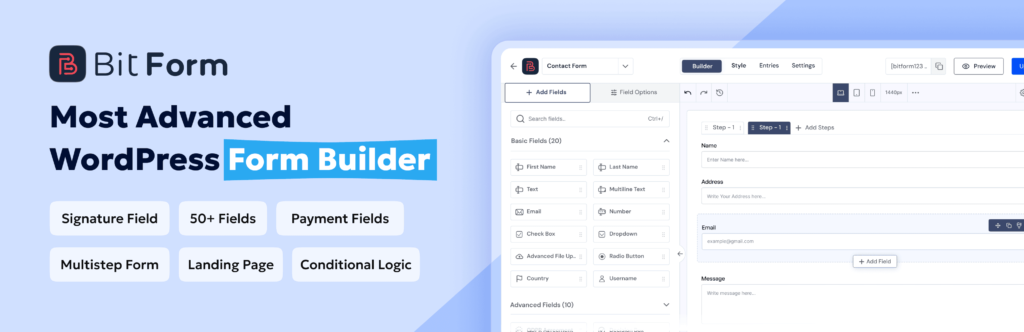
Bit Form offers a clean drag-and-drop interface that is easy to understand. Fields are organized in a sidebar, while settings such as validation, notifications, integrations, and conditional logic are grouped into separate panels.
The latest version introduces a refreshed dashboard, better field organization, responsive previews, and inline field insertion, making the builder feel more modern than earlier releases.
For beginners, creating a basic contact form is straightforward. More advanced users can gradually explore features like conditional logic, payment fields, and automation without feeling completely overwhelmed.
One of Bit Form’s strengths is that it keeps advanced functionality within reach while maintaining a reasonably organized interface.
However, as forms become more complex, the growing number of settings and configuration panels can require additional navigation.
What We Like
- Clean drag-and-drop experience
- Logical settings organization
- Beginner-friendly workflow
- Strong advanced configuration options
BoldForm
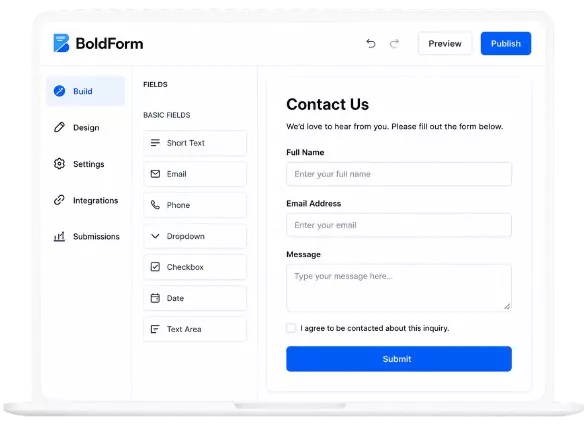
BoldForm immediately stands out with its polished, distraction-free interface.
Instead of overwhelming users with numerous menus and configuration screens, everything is organized around a visual editing experience. Fields can be dragged directly into responsive multi-column layouts, reordered instantly, and customized without leaving the builder.
One of BoldForm’s biggest advantages is its Live Style Editor.
Rather than making changes blindly and previewing them later, every adjustment appears instantly while editing. Typography, spacing, labels, field styles, buttons, gradients, hover effects, responsive layouts, and design themes update in real time.
This significantly reduces the amount of trial and error normally involved in styling forms.
For agencies, designers, and businesses that care about branding consistency, this visual workflow feels much faster than traditional styling panels.
The interface also follows familiar WordPress design patterns, making it feel like a natural extension of the WordPress dashboard rather than a completely separate application.
What We Like
- Extremely clean interface
- Real-time visual styling
- Responsive editing controls
- Excellent organization
- Native WordPress experience
Winner: Tie
Both plugins deliver an excellent editing experience.
Bit Form provides slightly more advanced configuration options, making it attractive for users building complex workflows.
BoldForm focuses more on visual editing, design consistency, and ease of customization.
If you value advanced functionality, Bit Form may feel more capable.
If you prioritize a polished editing experience, BoldForm has a slight edge.
Available Form Fields
A form builder is only as useful as the fields it provides.
Let’s compare their available field types.
Bit Form
Bit Form offers one of the largest collections of fields among modern WordPress form builders.
The free version already includes more than thirty-eight fields, while the Pro version expands the collection beyond fifty.
Some notable field types include:
- Text
- Phone
- Number
- Country
- Currency
- Date
- Time
- File Upload
- Hidden Field
- Image Select
- Rating
- Slider
- Repeater
- HTML
- Divider
- GDPR Agreement
- Multi-step Navigation
- CAPTCHA
- Cloudflare Turnstile
The Pro version further adds:
- Stripe
- PayPal
- Razorpay
- Mollie
- Signature
- Advanced File Upload
- Email OTP
- Draft Button
- Advanced Date-Time
This makes Bit Form suitable for virtually every business scenario.
BoldForm
BoldForm includes an impressive selection of practical fields while keeping the overall experience streamlined.
Its field collection includes:
Standard Fields
- Text
- URL
- Phone
- Number
- Textarea
Choice Fields
- Select
- Multi Select
- Radio
- Checkbox
- Country
Advanced Fields
- Address
- Name
- File Upload
- Input Mask
- Date Picker
- Time Picker
- Slider
- Star Rating
- HTML Editor
- Section Break
- Terms & Conditions
The Pro version introduces even more advanced components, including:
- Signature
- Rich Text
- Repeater
- Calculations
- Geolocation
- NPS
- Hidden Data
- Auto Populate
Although BoldForm offers fewer overall field types than Bit Form, every included field is well integrated into the builder.
Winner: Bit Form
Bit Form clearly provides a broader selection of fields, particularly in the free version.
If your forms require payments, OTP verification, advanced uploads, repeaters, or complex workflows, Bit Form offers more flexibility out of the box.
BoldForm still covers nearly every common use case but keeps its field collection more focused.
Ready-Made Form Templates
Templates allow users to launch forms quickly without building everything manually.
Bit Form
Bit Form includes templates for common use cases such as contact forms, registration forms, booking forms, surveys, payment forms, support forms, feedback forms, order forms, and calculators.
These templates provide a solid starting point and can be customized extensively after import.
Users who frequently build different types of forms will appreciate the variety.
BoldForm
BoldForm approaches templates with quality rather than quantity.
Instead of shipping dozens of generic layouts, it includes eleven carefully designed templates organized into practical business categories.
These include contact forms, newsletter signups, customer feedback, user registrations, lead generation forms, support tickets, quote requests, event registrations, appointment bookings, job applications, and customer surveys.
Each template follows clean design principles and can be customized visually inside the builder without requiring additional styling.
For businesses looking to launch quickly, these templates reduce setup time while maintaining a professional appearance.
Winner: BoldForm
Both plugins include useful templates, but BoldForm’s curated library focuses on real-world business needs. Combined with its visual styling controls, it’s easier to transform these templates into forms that match your website’s branding.
Performance and Speed
Website speed directly impacts user experience, SEO rankings, and conversion rates. A form builder should add functionality without slowing down your pages.
Bit Form
Performance is one of Bit Form’s strongest selling points.
For simple contact forms, it loads only around 20 KB of JavaScript and CSS, helping keep page weight low. As forms become more advanced with conditional logic, integrations, payments, or calculations, additional assets are loaded as needed rather than all at once.
This modular approach allows Bit Form to remain lightweight while still supporting complex form workflows. The builder is responsive, and front-end forms generally feel fast even when handling large forms with multiple fields.
BoldForm
BoldForm is also designed with performance as a core principle.
Instead of loading assets site-wide, it only loads JavaScript and CSS on pages where a form actually exists. Even its reports dashboard avoids external charting libraries by using the browser’s native HTML5 Canvas API, reducing unnecessary overhead.
All bundled libraries are served locally rather than from CDNs, giving site owners more control over privacy and performance.
From a real-world perspective, BoldForm feels exceptionally lightweight and follows WordPress best practices for asset loading.
Winner: Tie
Both plugins perform exceptionally well compared to many older WordPress form builders.
Bit Form demonstrates impressive optimization with its minimal asset footprint, while BoldForm goes a step further by conditionally loading assets and avoiding unnecessary third-party libraries throughout the plugin.
Conditional Logic
Conditional logic transforms a basic form into an interactive experience. Instead of displaying every field to every visitor, it allows forms to respond dynamically based on user input. This not only improves usability but also keeps forms shorter and more relevant.
Bit Form
Bit Form offers an advanced conditional logic system that supports a wide range of actions. Depending on the conditions you define, fields can be shown or hidden, enabled or disabled, updated dynamically, or made read-only. It also supports nested rules using AND and OR conditions, along with Else If and Else branches for creating more complex workflows.
This level of flexibility makes Bit Form suitable for quote forms, calculators, booking forms, payment forms, and other advanced use cases where the form needs to adapt to different scenarios.
BoldForm
BoldForm also includes conditional logic that allows fields to appear or disappear based on previous answers. Users can create multiple conditions using AND and OR rules, making it possible to simplify long forms without sacrificing functionality.
The setup process is straightforward, keeping the configuration easy to understand even for users who are new to conditional logic. For most business forms, surveys, registrations, support requests, and lead generation forms, the available options provide more than enough flexibility.
Verdict
Both plugins offer capable conditional logic systems that handle most real-world requirements effectively. Bit Form provides more advanced rule configurations, while BoldForm focuses on a cleaner and more accessible setup experience.
Form Styling and Customization
A form should blend naturally with your website instead of looking like a third-party component. Customization options play an important role in maintaining a consistent brand identity.
Bit Form
Bit Form includes a built-in style editor that lets users customize layouts, colors, typography, spacing, buttons, backgrounds, and other visual elements.
The free version covers the essential styling options, while the Pro version expands customization with more detailed field-level controls.
For users who need additional flexibility, Bit Form also supports custom CSS and JavaScript, allowing developers to extend the appearance and functionality even further.
BoldForm
BoldForm places a strong emphasis on visual customization.
Its Live Style Editor updates changes instantly while editing, allowing users to see typography, field styling, labels, buttons, spacing, colors, hover effects, gradients, and responsive adjustments without leaving the builder.
The ability to preview desktop, tablet, and mobile layouts during editing also makes responsive customization significantly easier.
For designers and agencies, this visual workflow can reduce the amount of time spent switching between editing and previewing.
Verdict
Both plugins provide extensive customization options.
Bit Form offers flexibility through built-in styling tools and developer customization, while BoldForm focuses on delivering a more visual editing experience with live previews and responsive design controls.
Entry Management
Managing submissions efficiently becomes increasingly important as your website receives more form responses.
Bit Form
Bit Form stores form entries directly inside the WordPress dashboard, allowing users to review submissions, search records, and export collected data.
The Pro version extends entry management with editable submissions, front-end data views, role-based permissions, and improved filtering capabilities. These features are especially useful for membership sites and businesses that need ongoing interaction with submitted information.
BoldForm
BoldForm provides a comprehensive entry management system that keeps every submission organized within the WordPress dashboard.
Entries can be marked as read, unread, starred, or spam, making it easier to prioritize important responses. Instead of permanently deleting entries immediately, they can first be moved to the Trash and restored later if necessary.
Bulk actions simplify managing larger numbers of submissions, while CSV export allows data to be transferred easily for reporting or further analysis.
The built-in reports dashboard also provides an overview of total forms, submission counts, and individual form activity.
Verdict
Both plugins provide reliable entry management capabilities.
Bit Form offers additional front-end management features in its Pro version, while BoldForm places greater emphasis on organization, reporting, and day-to-day management within the WordPress dashboard.
Integrations
Integrations allow form submissions to become part of larger business workflows by connecting with CRM systems, email marketing platforms, automation services, cloud storage, and other applications.
Bit Form
Integrations are one of Bit Form’s strongest areas.
The free version already connects with numerous services, including Google Sheets, Mailchimp, HubSpot, FluentCRM, Dropbox, Telegram, WooCommerce, Zapier, Make, Pabbly, Zoho products, MailerLite, ActiveCampaign, Brevo, Twilio, Webhooks, and many more.
For businesses relying heavily on automation, this extensive ecosystem provides significant flexibility.
BoldForm
BoldForm includes essential integrations in its free version, including Mailchimp, Brevo, SMTP configuration, and email notifications.
The Pro version expands this considerably with support for more than thirty integrations across several categories.
These include popular email marketing services such as ActiveCampaign, AWeber, Kit, MailerLite, Constant Contact, Drip, and Moosend.
CRM integrations include HubSpot, Salesforce, Zoho CRM, Pipedrive, Freshsales, FluentCRM, Help Scout, and monday.com.
Automation platforms such as Zapier, Make, and Pabbly Connect are also supported, along with productivity tools including Airtable, Notion, Trello, Asana, Google Sheets, Google Drive, Dropbox, Slack, Discord, Telegram, and Microsoft Teams.
Verdict
Both plugins provide strong integration capabilities.
Bit Form offers a broader range of free integrations, while BoldForm’s Pro ecosystem covers the most widely used business, marketing, automation, and collaboration platforms.
Spam Protection
Spam protection is essential for maintaining clean form submissions and reducing unwanted traffic.
Bit Form
Bit Form supports multiple protection methods, including Google reCAPTCHA v2, reCAPTCHA v3, hCaptcha, and Cloudflare Turnstile.
The Pro version also introduces Honeypot protection and double opt-in verification for additional security.
BoldForm
BoldForm includes several spam protection options, including Honeypot, Google reCAPTCHA v2, hCaptcha, Cloudflare Turnstile, and a built-in Math CAPTCHA that works without requiring external API keys.
This variety allows users to choose a solution that matches their privacy preferences and technical requirements.
Verdict
Both plugins offer strong spam protection features with support for today’s most popular verification methods.
Developer Experience
For agencies and developers, extensibility is often just as important as the visual builder itself.
Bit Form
Bit Form supports custom JavaScript, custom CSS, APIs, webhooks, and several advanced configuration options that allow developers to extend form functionality beyond the default builder.
These capabilities make it suitable for projects requiring custom workflows or external integrations.
BoldForm
BoldForm includes a documented action and filter API that allows developers to hook into validation, rendering, submissions, integrations, and entry storage.
Developers can register custom field types, extend functionality through add-ons, automate post-submission actions, and customize workflows without modifying the plugin core.
This architecture makes BoldForm particularly suitable for agencies building custom client solutions.
Verdict
Both plugins provide useful tools for developers.
Bit Form focuses on flexibility through APIs and customization, while BoldForm offers a structured extension system that integrates cleanly with WordPress development practices.
Privacy and Data Ownership
Privacy has become an increasingly important consideration when choosing WordPress plugins.
Bit Form
Bit Form stores submissions within the WordPress database and offers various export options for managing collected data.
Its integration options allow businesses to send submissions to external services when configured.
BoldForm
BoldForm takes a privacy-first approach by storing submissions entirely within the website owner’s database unless external integrations are explicitly enabled.
It also integrates with WordPress privacy tools, allowing administrators to export or erase personal data upon request. Optional uninstall cleanup further gives users control over stored information.
Verdict
Both plugins provide solid privacy features and allow website owners to maintain control over collected data while supporting external integrations when required.
Import and Export Tools
Website migrations and backups become much easier when form data can be transferred efficiently.
Bit Form
Bit Form allows forms and collected data to be exported for backup and migration purposes, making it easier to move between websites or preserve important submissions.
BoldForm
BoldForm includes dedicated tools for exporting and importing forms, entries, and global settings as JSON files. Users can migrate individual forms or entire configurations between websites with minimal effort.
Verdict
Both plugins support migration workflows, helping users preserve forms and submissions when moving websites or creating backups.
Pricing
Pricing often becomes the deciding factor when choosing a WordPress form builder. While features are important, the overall value depends on what you get in both the free and premium versions.
Bit Form
Bit Form’s free version is generous and includes unlimited forms, unlimited submissions, conditional logic, multi-step forms, responsive layouts, email notifications, integrations, and a wide variety of form fields.
The Pro version unlocks advanced features such as payment gateways, PDF generation, user authentication forms, form abandonment, landing pages, advanced uploads, email OTP verification, signature fields, and additional integrations.
For users looking for an extensive feature set, Bit Form provides a comprehensive upgrade path.
BoldForm
BoldForm’s free version covers everything needed to build professional business forms, including a drag-and-drop builder, responsive layouts, conditional logic, AJAX submissions, spam protection, entry management, reporting, templates, and email marketing integrations.
The Pro version expands its capabilities with multi-step forms, advanced fields, payment integrations, analytics, webhooks, automation platforms, CRM integrations, storage services, and additional productivity tools.
Rather than overwhelming users with numerous premium-only features, BoldForm focuses on expanding practical functionality while keeping the overall experience consistent.
Verdict
Both plugins provide strong value in their free versions and meaningful upgrades through their premium plans. The better choice ultimately depends on whether your priority is maximizing available features or investing in a streamlined, business-focused workflow.
Pros and Cons
Every plugin has strengths and limitations. Here’s a balanced overview.
Bit Form
Pros
- Large collection of built-in form fields
- Extensive free integrations
- Powerful conditional logic
- Supports payment forms
- Multi-step forms available in the free version
- Suitable for advanced workflows
Cons
- Large feature set may feel overwhelming for beginners
- Some advanced options require additional configuration
- Interface can become busy when working with complex forms
BoldForm
Pros
- Clean and intuitive drag-and-drop builder
- Excellent live styling experience
- Lightweight architecture with optimized asset loading
- Comprehensive entry management
- Built-in analytics dashboard
- Strong privacy and data ownership features
- Developer-friendly architecture
- Easy import and export tools
Cons
- Some advanced features are available only in the Pro version
- Integration library in the free version is smaller than Bit Form’s
Which Plugin Should You Choose?
Choosing between Bit Form and BoldForm isn’t about identifying a universally better plugin. It’s about selecting the one that best aligns with your workflow and long-term needs.
Choose Bit Form if:
- You need access to a very large collection of form fields.
- Your workflows depend on numerous free integrations.
- You frequently build highly customized forms with advanced logic.
- Multi-step forms are essential in the free version.
Bit Form is a capable solution for users who prioritize flexibility and feature availability.
Choose BoldForm if:
- You value a clean and intuitive user experience.
- Website performance is a priority.
- You want forms that are easy to design without writing CSS.
- You manage forms regularly and need organized entry management.
- Privacy and data ownership matter to your business.
- You build websites for clients and appreciate a developer-friendly architecture.
- You want a form builder that feels like a natural part of WordPress.
BoldForm focuses on delivering a balanced experience where usability, performance, and functionality work together instead of competing with each other.
Final Verdict
Bit Form and BoldForm are both modern WordPress form builders capable of handling everything from simple contact forms to advanced business workflows. They each offer responsive drag-and-drop builders, conditional logic, spam protection, entry management, and a solid collection of customization options.
Where they differ is in their overall philosophy.
Bit Form emphasizes feature breadth. It offers an impressive collection of fields, integrations, and advanced capabilities, making it a strong choice for users who want as many built-in tools as possible.
BoldForm focuses on delivering a refined user experience. Its clean interface, live design controls, optimized performance, thoughtful entry management, privacy-first architecture, and developer-friendly foundation make it feel polished from both an end-user and administrator perspective.
For many businesses, agencies, freelancers, and WordPress professionals, ease of use is just as important as feature count. A plugin that simplifies everyday workflows while maintaining excellent performance can save time and reduce complexity over the long term.
If your priority is having the broadest possible feature library, Bit Form is an excellent option.
If you’re looking for a modern form builder that combines speed, usability, professional design controls, and a seamless WordPress experience, BoldForm stands out as the stronger overall choice. Its balanced approach makes it well-suited for websites that need reliable forms today while remaining flexible enough to grow with future requirements.
Ultimately, both plugins are capable solutions, but BoldForm offers a more refined experience that many WordPress users will appreciate long after their first form is published.

Build Forms Without Coding